
Digital Certificate which is also called as Digital ID, is one of the credential which is used to provide identification over internet. In other words, you can say it’s similar to driving license, national or international passport. It gives an information about the identity of the particular entity or any information related to it. It comes with digital documents, which helps in serving the identification. It is issued by the trusted CAs (Certificate Authorities,) who also provide the validity of the certificate which are issued by them, which in return work as a proof that the person or any entity to whom the certificate is issued is not fake and they are what they say are. For proving this, CAs applies their digital signature, which tells that the certificate is not altered and it’s original.
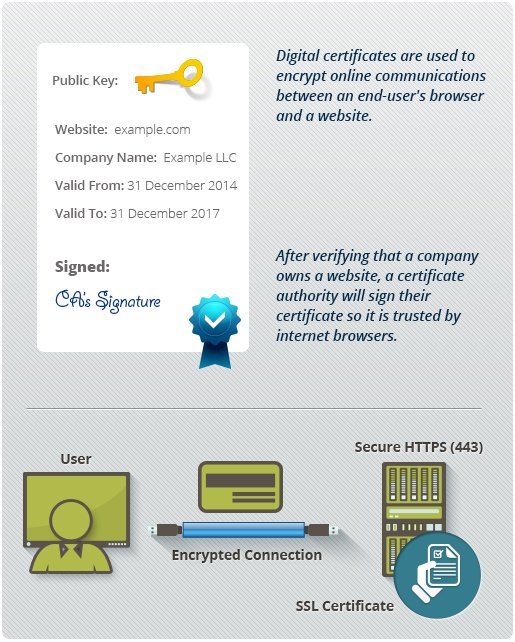
Every certificate issued by CAs are unique to identify, as they offer serial number, holder's name, how long the certificate is valid (expiration date), public key of the owner of the certificate which is used during the process of encryption & authentication, lastly signature of the CAs who has issued the certificate.
Commonly it’s used where business transactions asks for encryption, digital signing or authentication. Before we get more into Digital certificate, first let’s see what SSL/TLS (Secure Sockets Layer/Transport Layer Security) certificate is. SSL/TLS is one of the today's trending technology which offers security protocol in order to secure communications and transactions which happens on internet. It plays a big role in today's internet transactions which took place in regard to e-commerce or e-business. Though SSL/TLS certificates uses the protocol of digital certificates to make a successful, secured & confidential communication between two parties, but still it differs from Digital certificate.
The main difference between SSL/TLS certificate & Digital certificate is that SSL/TLS certificates are used for securing the transactions or communications which happens between web browsers and server, which is done by showing the secured connection of “https,” whereas Digital certificates, are mostly used to do code signing of the software or its related content, which is later on used by its distributors.Sometimes, digital certificates are also referred to as code signing certificate which helps users to identify that the signed software is by authorized person.
Contents of Digital Certificate:
The content of Digital Certificate is in text format which is visible to everyone, as it does not contain any confidential information which should be remain private. Due to this, visitors of the website are able to decide whether they can trust the certificate holder and certificate provider or not.
An Architecture of Digital Certificate:
Certain information regarding user, computer or services are kept in public key, which is provided as the information regarding the subject of the certificate like, services, and applications which can be used by certificate. As per the certain standards of Public-Key Infrastructure (X.509) Working Group (PKIX) of IETF (Internet Engineering Tasks Force), these are some of the objectives which is mandatory to be met with the certificates that are issued for Windows Server 2003 or earlier PKIs.X.509 version 3 certificate is the latest format of the certificate which is used in a Windows Server 2003 PKI. Below is the figure of the same.
X.509 Version 3 Digital Certificate
X.509 Version 3 Certificate:
Here are the fields that are supported by X.509 version 3 certificate.
Subject: It is also referred through the use of X.500 or LDAP format (Lightweight Directory Access Protocol.) It provides certain information like computer name, user information, network device, services which are issued by CA for the certificate.
Serial Number: It's used for the unique identification of every certificate that's issued by CAs.
Issuer: The name of the issuer is most of time referred through format of X.500 or LDAP and it offers the notable name for the CA who issues the certificate.
Valid From: The date & time from when the certificate became valid.
Valid To: The date and time, when certificate expires and can no longer be considered as valid.
Public Key: Provides the public key which is used with the certificate.
In X.509 version 3 certificates, additional extensions are provided which offers additional features and functions to certificates. Though it's optional and it’s not necessary that it will be included in all the certificates which are issued by CAs and they are as follows:
Subject Alternative Name: More than one format can be used to make the subject. Let say, if the certificate has to be issued which must have the account name of the user in LDAP distinguished format, name, e-mail address, UPN (User Principal Name,) then it can be included in the certificate through adding the extension of subject alternative name which provides the formats for additional name.
CDP (CRL Distribution Points): Whenever any user, service or computer issues a certificate, a service or an application, is there to acknowledge that the certificate has been revoked before the expiration of its validity period. The work of CDP extension has to do the same, it offers more than one URL where the service or application are capable of getting the CRL (Certificate Revocation List.)
AIA (Authority Information Access): Once a certificate gets validated by the service or an application, the CAs certificate who issued the certificate, also called as parent CA is also tested for the validity period and revocation. This AIA extension provides more than one URLs, from which the service or an application can recover the certificate of the CA.
EKU (Enhanced Key Usage): This extension comes with an OID (Object Identifier) option for all the services and application which can be used by other applications. All OID comes with a unique number sequence from the worldwide registry.
Certificate Policies: It determines the rules and regulations which has to be followed by the organization to get the validation of the certificate request or before a certificate get issued. For the process of validation, OID is used which can also include URL which is policy-qualified, which fully describes what measures had to be taken in order to validate the identity.
Certificate Templates:
Certificate templates are used by CAs of Windows 2000 & Windows Server 2003 Enterprise. It is stored under the services directory named Active Directory. It offers default attributes to certificate, which includes authorized uses of the certificate, cryptographic algorithms that are used along with certificate, length of public key, format of the subject, requirements of issuance.
Certificate templates are basically configured over enterprise CA, and these templates are used to accept or reject any new certificate request which is coming in. Another thing to note is that, only enterprise CAs are able to issue certificates which are based on certificate templates. Information regarding certificate template is stored under the directory named as Active Directory.
CN=Certificate Templates, CN=Public Key Services, CN=Services, CN=Configuration, DC= BrattRootNameDN
To note, BrattRootNameDN is the LDAP distinguished name of the forest root domain.
By default few certificate templates are offered to new CA installation. If needed more, they had to be assigned additionally.
Certificate templates are divided under two different categories. Firstly, certificate templates which are allotted for users and another one is certificate templates that are allotted for computers. One thing to know is that, certificates which are issued for computers can only be used by computers and the certificates which are issued for users can only be used by users. Apart from that, you can also distribute the certificate based upon their use.
Single Function: As it name says, this certificate template is limited for the single function. For example, at a time it can be used for only one function for which it is assigned like for only encrypt to decrypt files.
Multiple Function: Multiple function certificate templates offers more than one function. For example, you can use the same certificate template for encrypting & decrypting the files, to authenticate with server and also to send and receive emails.
Process & Interactions of Digital Certificate:
As discussed earlier, digital certificates are one type of credentials and like other credentials such as passport or driver license, this also has to be created before making any use of it. Once it’s created, there has to be a valid reason to validate the authenticity of that certificate and verification is also needed to know its usage purpose. Once these certificates are created and validated, it can be used for some of the below basic cryptographic functions
- Public Key Encryption.
- Message Digest Functions.
- Digital Signing.
Digital Certificates - How it's created?
CA (Certificate Authority) are the ones who issues Digital Certificates. CAs can be any service or valid entity who is ready to do the verification of identity and validate them with its provided keys, to those the certificate has been issued. For example it’s possible, that companies might issue certificates to their employees. One important thing is that, public key of CA's should be trustworthy or else the certificates won't be trusted. As anyone can become a CA, digital certificates can be trusted up to a level as much the CAs who has issued the certificate, can be trusted.Below steps shows the procedure for requesting and issuing the digital certificate.
1. Pair of Keys: The applicant is provided with the private and public by any authority or any valid organization.
2. Collecting Mandatory Information: Applicants have to provide all the necessary documents asked by the CA for issuing digital certificate. The information are like applicant's e-mail address, fingerprints, birth certificate and some other documents asked during the identity verification process.
3. Requesting for Certificate: In order to get the certificate, request has to be send for the issuance of the certificate with all the required documents. It can be sent through email or postal & courier is also allowed. Request for the certificate should also be notarized.
4. Information Verification: The CA follows through their policies and guidelines in order to issue the certificate. These policies includes verification of provided information as well.
5. Creating Certificate: After all the verification process, CA generate and sign a digital document which also includes the public key of the applicant and other necessary information. The digital document which is signed is called as certificate.
6. Sending the Certificate: After the certificate has been created, it’s sent to the applicant.
Validation Process of Digital Certificate:
Once the certificate is received, before it’s acknowledged that the certificate is trustworthy Windows perform certain validation process to make sure that the certificate is valid.
To know what the status of the certificate is, it’s categorized under three different steps which are implemented through CryptoAPI.
- Discovery of Certificate: Here the process of collection of certificates of CAs is done through Group Policy, Enterprise Policy and AIA pointers which are all issued in certificate itself.
- Validation of Path: The steps through which issuer certificate & public key certificates are processed through in a hierarchical order till the chain of certificates reach an end point which is trusted and self-signed certificate. Most of time it’s a root certificate of CAs.
- Checking of Revocation: All the certificates goes through verification to make sure that none of them has been revoked.Generally this revocation checking occurs during the process of chain building or after the completion of chain building.
Storage of Certificate: In Windows XP & Windows Server 2003, certificates are stored in local computer or hardware device for which the certificate has been requested. Generally, there are two different type of certificate stores which is called as the machine store and another one is the user store. Its user store is known and referred to as “My Store,” which is used by the user who is currently logged-in. These certificate stores contains more than one certificate, which are most probably issued by different CAs as well.
Purpose of Chain Building: All the certificate chain are built through certificate chain engine. Graph of certificate chain is created, and from that it’s ordered through its quality. The certificate chain with finest quality is selected and returned as an end certificate for the application it’s requested for as by default chain.
All the certificate chains have one thing in common, they are built with the combination of certificates which are available in the published URL locations and certificate stores. Every certificate included in the chain, have a status code which shows that the certificate is like, does it contains a valid signature, is the start and expiry date of the certificate properly configured, is the certificate expired, has the certificate ever been revoked, is any of the certificate expired which is higher in PKI, is there any restrictions set on certificate.
Path Validation of the Certificate: The validation path of the certificate gives an assurance that a valid path of the certification can be made for any given end certificate. It is defined as a certificate of end-user which can be tracked with a certificate chain in a trusted root CA. At the time of an occurring of this process, it’s possible that certain certificates might not be considered valid, and it could be due to some of the reasons:
- Valid time period is not configured, it usually happens when the start and expiry date of the certificate is not proper.
- If the format of certificate is not proper or does not match with the format of X.509 (versions 1 to 3 mostly for digital certificates), it is possible that certificate might go unrecognized due to which it gets discarded.
- The information in the fields of certificate is not filled properly or something is left.
- The digital thumbprint and signature of the certificate do not pass the integrity check which in result shows that the certificate has been altered or its corrupted.
- The status of the certificate has been kept for revoke.
- The CA who is issuing the certificate does not belongs to the list of trusted certification.
- Trusted Root Certificate Authorities store does not have the certification path of the root CA.
- The certificate does not have the permission to be used as per the specification of the CTL.
- The certificate carries an extension which is not understand by an application.
Application Policy: Certificates offers important information which is not specific for any application, but it is important to know which certificates should be used for some of the functions. Application policy let you issue certificates and also restrict their use for specific tasks.
Basic Operations of Cryptography: Information provided in certificates are like the identity of the holder of the certificate (which is known as subject) as an entity over network, public key of the certificate's owner. It also provide information of who is the CA (Certificate Authority) that issued the certificate.
All the certificates issued by CAs are digitally signed with the help of their private key. CAs create Message digest from the certificate itself and encrypt it with the private key, to make the digital signature which further becomes a part of the certificate. Anyone can verify the integrity of the certificate by just using the CA's public key and message digest function. If by any chance a certificate get corrupted or shows that it’s altered by someone, the message digest of that altered certificate won't match with the digest which is in the digital signature of the CA. This image shows how CA signs the certificate.
Digital Certificate Authority Keys
In the certificate X.509 version 3, Subject Public-Key Value field holds the cryptography operations for which both public and private key set can be used. Here are the basic cryptography operations which are maintained with the security system of Public Key.
- To do the verification of the integrity and origin of the data, digital signing of digital data is done.
- The symmetric secret encryption which are shared and transmitted over networks are protected with the help of secret key encryption.
1. Signature: It’s used for signing, authenticating the data or assuring that data is not duplicated.
2. Encryption: For the encryption and decryption of data.
3. Signature & Encryption: It combines both, does the authentication and digital signing of the data and encryption & decryption as well.
4. Signature & Smart Card Logon: Digital signing of data and smart card logon.
Several security functions regarding security technologies can be achieved through public and private key set. Some of the security functions which can be made through public key are:
- During e-mail communications, providing security by offering authentication, integrity & confidentiality.
- Securing web communications done between web users and servers, by offering authentication and privacy.
- Code signing for the integrity of the codes, which are shared over internet.
- Local or remote login credentials for the users associated with the network.
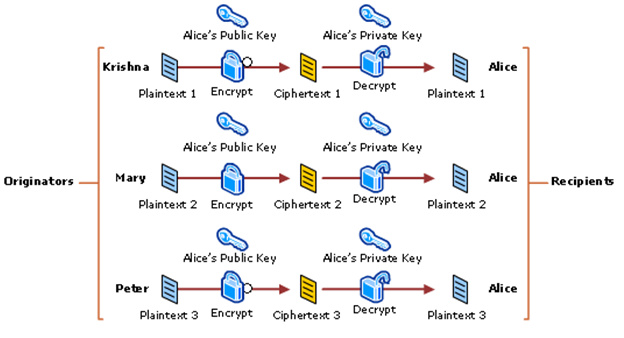
Encryption & Decryption using Asymmetric Keys
- To encrypt symmetric keys for protecting it during the sharing done over internet or other networks.
- Digital signature to offer authentication& integrity to online data.
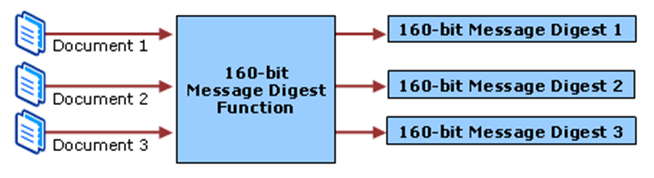
Process of Message Digest
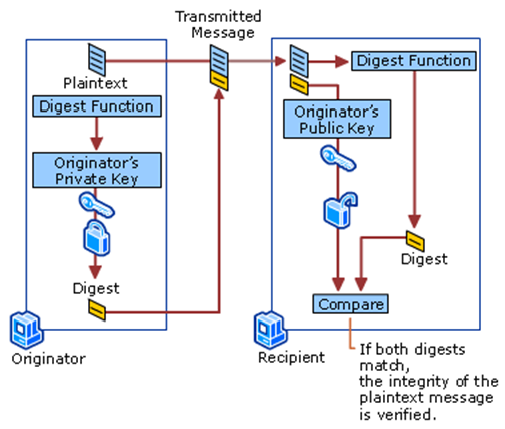
As the message digest is signed digitally along with the private key of the sender, it’s not possible for any intruder to alter or play any mischief with the message.
Digital Signatures: Mostly public key encryption is used to offer digital signatures. Digital signature is similar to hand-written signatures or an actual thumbprints of humans which is used for the identification of the people for important things like online transactions. Digital signatures does the unique identification of the data which is signed with the digital signature and also assures that data is not altered.
One of the way to create digital signature is through the actual owner of the data. Simply create the signature by encrypting all the data with the private key of the owner of that data and assign the signature along with it. Anyone, who have its matching public key will be able to decrypt the digital signature and able to see the actual message. As digital signature can be made only by someone who possess private key, it will be sure that the decrypted message is not altered and it’s original. Even if any mischief has been done, then also the attacker won’t be able to create a new original signature. Lastly, if the signature get altered, it won’t be able to pass the verification which will make it invalid.
Here are few of the reasons which clears that it’s not necessary to encrypt all data to offer digital signature.
- The encrypted message is almost same or greater in size, than the plain text message. Due to this bandwidth and storage space is consumed in huge amount.
- It affects the performance of computer negatively as the encryption of Public key takes a lot of load while doing computation.
- The huge data of cipher text which are produced during the encryption of all data, can make some negative impact. As these cipher text can be used during attacks like cryptanalysis.
The SSL Store™, is one of the biggest reseller who is Platinum Partners with the world's most recognized CAs (Certification Authorities), which includes Symantec, GeoTrust, Thawte, RapidSSL, Certum and Comodo. If you are looking for digital certificate, we can help you get your own SSL/TLS certificate. The Digital certificates offered by us are exactly the one which are sold by the Certificate Authority. Benefit of purchasing from us is that you will get in the price range, you can afford easily. As we purchase in bulk quantity, you will be able to enjoy the discounts we offer. We also offer one of the best technical support to solve any of your query. We have the team of experienced web security specialists, which will guide you to getting your digital certificate.
With all the information we've been able to provide about Digital certificates, the technology behind it, its structure, its processes and the different interactions that takes place during encryption, do you think we're a bit behind? Let's talk below.