
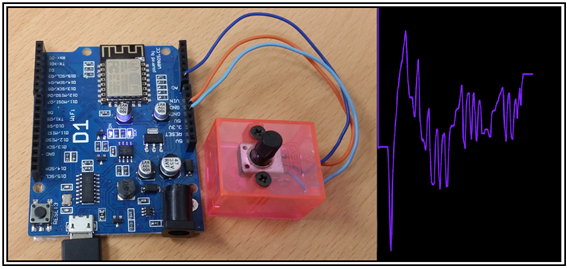
Processing 클라이언트에 의한 사물인터넷 WiFi 제어는 웹을 중심으로 이루어지는 HTML 기반의 웹서버 제어와 비해 코딩에서의 자유로움이 더해져 훨씬 재미있다.(???) 웹서버 코드에서 이루어지는 HTML 방식에 의한 버튼 입력이라든지 또는 텍스트 박스를 이용한 입력에 비할 바가 아니다. 물론 HTML 에서도 Range Slider와 같은 아날로그 적인 멋있는 입력 툴이 전혀 없는 것은 아니나 Processing 의 Gradient 컬러 띠에서 스캔하는 입력 방식과 비교하면 웬지 구닥다리처럼 딱딱하게 느껴진다.
네트워킹 방법 측면에서 보면 이더넷과 무선 와이파이를 생각할 수 있겠다. 유선에 해당하는 이더넷을 사용하여 Processing 과 인터페이스 코딩을 해보면 통신 속도가 엄청 빠름을 느낄 수 있다. 하지만 거치장스러운 파워라인과 RJ45 인터넷 연결선을 보면 한숨이 나올 수 있다. 역쉬 아두이노와 Processing 간의 사물인터넷 통신은 무선 와이파이가 제격인 듯하다.
이미 중요한 몇가지 예제를 블로그에 포스팅하였다.
- Processing 클라이언트에 의한 NodeMCU/WeMos 보드에 설치된 LED 의 digitalWrite() 명령에 의한 ON OFF 및 Processing 그래픽 화면의 컬러 반응
- Processing 그래픽 화면에서의 Gradient 컬러 화면 스캔에 의한 NodeMCU/WeMos 보드에 설치된 LED의 anlogWrite() 명령에 의한 밝기 조절
- Node/WeMos 보드에 설치된 조도센서 저항 값 변화의 Processing 그래픽 화면에서 관찰
이러한 예제 코딩에서 중요한 부분은 서버와 클라이언트 역할에 맞춰 제대로 코딩을 해야함과 아울러 통신에 따른 적절한 시간 간격을 맞춰주어야 한다는 점이다. 단순히 아두이노 웹서버 코딩에서는 아두이노 측에서 모두 코딩을 하여 client.print(“⚫▴◾”)를 통해 일괄적으로 웹에 보내 출력하면 저절로 통신 속도가 조절이 되는 이점이 있었지만 Processing 이 클라이언트일 경우는 사용자가 통신 속도를 조절해야 하는 문제가 있어 왔다.
앞서 언급된 3가지 유형 외에 한가지 추가해야 될 예제로서 NodeMCU/WeMos에 설치된 가변저항을 부드럽게 돌릴 때에 Processing 그래픽 화면에서 비슷한 느낌이 나도록 통신 시간 간격을 조절해야 할 필요가 있다. 물론 통신 지연이나 코드 실행에 다른 시간 지연이 전혀 없다면 아무런 문제가 없겠지만 엄연히 불연속적인 느낌이 드는 것은 NodeMCU/WeMos 보드 의 성능 한계 탓이겠지만 그래도 시간지연 간격을 조절함으로서 부드러운 결과를 얻어낼 수 있으리라 본다.
시간지연 간격을 결정하는 방법은 이미 2)번 3)번 예제에서 사용하였다. NodeMCU/WeMos 웹서버 코딩에서 클라이언트로부터의 request 가 한번 씩 즉 “GET / HTTP/1.0”이 올 때마다 loop() 가 실행되는 시간을 millis() 명령을 사용하여 체크하는 방식이다.
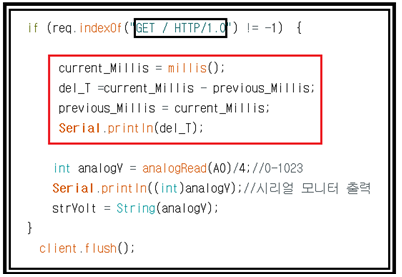
request 1 사이클마다 시간 간격이 확인되면 Processing 코드에서 시간 지연 값을 최종 적으로 부여하면 된다. 이러한 방법으로 조사한 결과에 의하면 대략 210∼220 msec 이다.
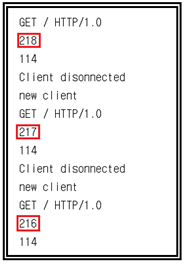
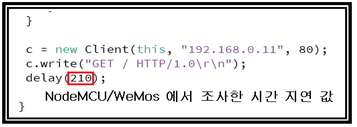
이 조사 된 값들을 보고 210 msec를 Processing 코드에 입력하도록 하자. 상당히 큰 값인데 사람의 감각이란 묘해서 동영상을 보면 그렁 저렁 부드럽다는 느낌을 가질 수 있으리라 본다.
하지만 NodeMCU/WeMos 보드를 사용하여 보다 높은 성능을 내는 또 다른 방법이 있을지는 지속적으로 찾아 볼 계획이다.
동영상을 통해 그래픽 화면에서 어느 정도 부드러운 통신 결과가 얻어지는지 관찰해 보자.
https://youtu.be/clUcD49orcc
//HTTPClient_weMos_variable_resistor_02
int xPos = 1; //
int lastxPos=1;
int lastheight=0;
import processing.net.*;
Client c;
String data;
void setup() {
size(600, 400);
background(0);
fill(200);
stroke(127,34,255); //stroke color
strokeWeight(2); //stroke wider
c = new Client(this, "192.168.0.11", 80);
c.write("GET / HTTP/1.0\r\n");
delay(210);
}
void draw() {
if (c.available() > 0) {
data = c.readString();
println(data);//
}
if (data != null) {
float inByte = float(data); // convert to a number.
inByte = map(inByte, 0, 256, 0, height); //map to the screen height.
//Drawing a line from Last inByte to the new one.
line(lastxPos, lastheight, xPos, height - inByte);
lastxPos= xPos;
lastheight= int(height-inByte);
// at the edge of the window, go back to the beginning:
if (xPos >= width) {
xPos = 0;
lastxPos= 0;
background(0); //Clear the screen.
}
else {
// increment the horizontal position:
xPos = xPos + 1;
}
}
c = new Client(this, "192.168.0.11", 80);
c.write("GET / HTTP/1.0\r\n");
delay(210);
}//Processing end
//Webserver_weMos_Processing_variable_resistor_01
#include <ESP8266WiFi.h>
const char* ssid = "android1234";//무선 공유기 id로 수정
const char* password = "dddddddddd";//무선 공유기 비빌번호
String s;
String strVolt;
long current_Millis = 0;
long previous_Millis = 0;
long del_T = 0;
int measurePin = 0; //Connect variable resistor to A0 pin
int ledPin = D2;
WiFiServer server(80);
void setup() {
Serial.begin(9600);
delay(10);
// prepare GPIO2
pinMode(ledPin, OUTPUT);
digitalWrite(ledPin, LOW);
// Connect to WiFi network
Serial.println();
Serial.println();
Serial.print("Connecting to ");
Serial.println(ssid);
WiFi.begin(ssid, password);
while (WiFi.status() != WL_CONNECTED) {
delay(500);
Serial.print(".");
}
Serial.println("");
Serial.println("WiFi connected");
// Start the server
server.begin();
Serial.println("Server started");
// Print the IP address
Serial.println(WiFi.localIP());
}
void loop() {
// Check if a client has connected
WiFiClient client = server.available();
if (!client) {
return;
}
// Wait until the client sends some data
Serial.println("new client");
while(!client.available()){
delay(1);
}
// Read the first line of the request
String req = client.readStringUntil('\r');
Serial.println(req);
client.flush();
// Match the request
if (req.indexOf("GET / HTTP/1.0") != -1) {
   current_Millis = millis();
   del_T =current_Millis - previous_Millis;
   previous_Millis = current_Millis;
   Serial.println(del_T);

  int analogV = analogRead(A0)/4;//0-1023
  Serial.println((int)analogV);//시리얼 모니터 출력
  strVolt = String(analogV);
}
client.flush();
// Prepare the response
s = "";
s += strVolt;
s +="\n\r";
client.print(s);
delay(1);
Serial.println("Client disonnected");
}//끝