
아두이노 코딩-84: WeMos 난수생성 웹서버 코딩 및 Processing 클라이언트 실시간 그래픽 처리
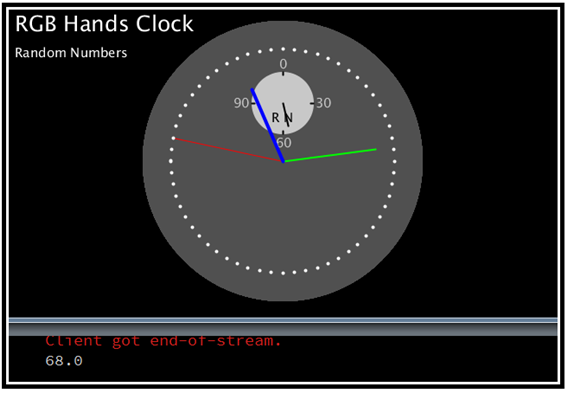
조도 센서를 사용하는 웹서버 코딩은 원래 클라이언트 역할을 담당하는 웹에서 가상ip주소로 request를 보내면 웹서버 코드에서 웹페이지 정보를 제공하도록 되어 있다. 하지만 Processing 클라이언트 코드에서는 웹서버 코드에서 전송되는 HTML 코드로 구성된 웹페이지 정보를 수신할 수 있지만 그 자체가 웹이 아니기 때문에 디스플레이와 입력에 문제가 발생한다. 따라서 request를 보낸 후 웹페이지 정보를 받을 것이 아니라 필요로 하는 변수의 정보만을 수신하여 Processing 코드로 처리할 필요가 있다.
1KΩ 저항과 작렬 연결하여 구성한 조도센서 회로에서 웹서버 방식으로 클라이언트에 전달되는 중요한 파라메터는 주위의 밝기에 따라 변하게 되는 조도센서 저항 값이다. 아두이노 보드 아날로그 핀을 통해 측정한 1KΩ 저항과 조도센서에 가해지는 전압으로부터 환산되는 이 조도센서 저항 값은 실내 창가에서 실험에 의하면 6KΩ을 임계값으로 한다.
따라서 6KΩ 임계값의 10배인 60이라는 값을 평균으로 하여 ∓10범위내에서 즉 50∼70범위의 난수를 생성시킬 수 있도록 웹서버 코딩을 수정해보자. 이 웹서버 코딩은 조도센서 회로가 없드라도 클라이언트인 Processing 코드에서 수신하여 실시간 그래프 처리를 해보도록 한다.
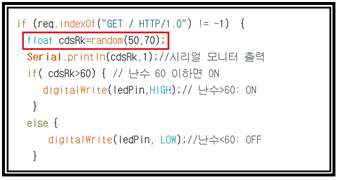
실제 조도센서 회로가 없기 때문에 직접 실수형 변수 cdsRk 의 값을 난수명령 random(50,70) 명령을 사용하여 난수로 취하면 된다.
Processing 코드는 조도센서 저항 실시간 그래프에서 미세먼지 측정기가 인터페이스된 Processing 시계 코딩의 시리얼 인터페이스 코딩을 와이파이 클라이언트 버전으로 조금 수정해서 사용하기로 하자.
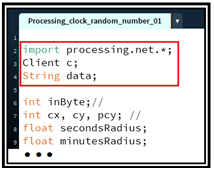
즉 processing.serial을 processing.net 으로 변경하고 Class 명령 Client를 c로 선언한다. 아울러 문자열 데이터로서 data를 선언한다.
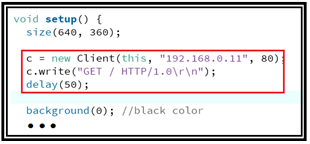
setup()에서 size() 다음에 막바로 클라이언트 연결 request 실행문을 넣는다. 아울러 draw(0에서 실시간으로 시계를 그려 준 후 끓어진 클라이언트를 다시 연결할 수 있도록 마지막 후반에 연결 request 실행문을 넣되 시간 지연 값을 조절해야 한다. 너무 짧으면 바늘의 움직임이 멈출 수 있으며 시험해본 결과 최소 값이 300 msec 였다.
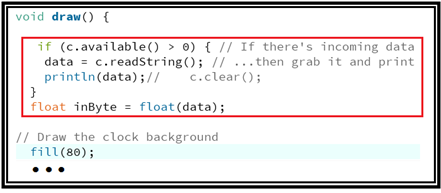
draw()를 실행하자마자 클라이언트 입력 버퍼를 점검해서 즉 c.available()에 입력된 문자이 있으면 data로 취해 출력 후 다시 이 문자 데이터를 실수로 바꾸어 inByte로 치환해둔다. inByte는 시계코딩에서 작은 시계 즉 미세먼지용 바늘침의 데이터로 사용되었으므로 여기서는 웹 클라이언트 인터페스에서 넘겨받은 난수를 inByte로 치환해주게 되면 작은 시계의 바늘이 움직이게 된다. 물론 작은 시계의 명칭을 PM에서 Random Number로 바꾸도록 한다.
다음 동영상에서 시리얼모니터에 출력되는 클라이언트로부터의 request와 함께 아두이노에서 생성한 난수가 출력되며 Processing 하단의 콘솔 창에서는 넘겨받은 난수를 출력하고 씰시간으로 난수의 변동을 바늘침으로 표현하였다.
//Processing_clock_random_number_01
import processing.net.*;
Client c;
String data;
int inByte;//
int cx, cy, pcy; //
float secondsRadius;
float minutesRadius;
float hoursRadius;
float clockDiameter;
float pmRadius;//
float pmDiameter;//
void setup() {
size(640, 360);
c = new Client(this, "192.168.0.11", 80);
c.write("GET / HTTP/1.0\r\n");
delay(50);
background(0); //black color
stroke(255); // white color
textSize(25);
text("RGB Hands Clock", 10, 30);
textSize(15);//
text("Random Numbers", 10, 60);//
fill(0,102,153);//
int radius = min(width, height) / 2;
secondsRadius = radius * 0.72;
minutesRadius = radius * 0.60;
hoursRadius = radius * 0.50;
clockDiameter = radius * 1.8;
pmRadius = radius * 0.25 *0.6;//
pmDiameter = radius * 0.4;//
cx = width / 2;
cy = height / 2; // Draw the minute ticks
pcy = 63* cy /100;//
}
void draw() {
if (c.available() > 0) { // If there's incoming data from the client...
data = c.readString(); // ...then grab it and print it
println(data);// c.clear();
}
float inByte = float(data);
// Draw the clock background
fill(80);
noStroke();
ellipse(cx, cy, clockDiameter, clockDiameter);
fill(200); //
ellipse(cx, pcy, pmDiameter, pmDiameter);//
// Angles for sin() and cos() start at 3 o'clock;
// subtract HALF_PI to make them start at the top
float s = map(second(), 0, 60, 0, TWO_PI) - HALF_PI;
float m = map(minute() + norm(second(), 0, 60), 0, 60, 0, TWO_PI) - HALF_PI;
float h = map(hour() + norm(minute(), 0, 60), 0, 24, 0, TWO_PI * 2) - HALF_PI;
float p = map(inByte, 0, 120, 0, TWO_PI) - HALF_PI; //
// Draw the hands of the clock
stroke(255,0,0);
strokeWeight(1);
line(cx, cy, cx + cos(s) * secondsRadius, cy + sin(s) * secondsRadius);
// Meter of Paticulate Matters: Random Number
stroke(0);//
strokeWeight(2);//
textSize(15);//
text("0", cx - 0.15 * pmRadius, pcy - 1.5 * pmRadius);//
text("30", cx + 1.4 * pmRadius, pcy + 0.2 * pmRadius);//
text("60", cx - 0.3 * pmRadius, pcy + 1.9 * pmRadius);//
text("90", cx - 2.1 * pmRadius, pcy + 0.2 * pmRadius);//
fill(0, 0, 0);//
text("R N", cx - 0.5 * pmRadius, pcy + 0.8 * pmRadius);//
line(cx, pcy, cx + cos(p) * pmRadius, pcy + sin(p) * pmRadius);//
line(cx, pcy - 1.3 * pmRadius, cx, pcy - 1.2 * pmRadius);//
line(cx - 1.3 * pmRadius, pcy, cx - 1.2 * pmRadius, pcy );//
line(cx, pcy + 1.3 * pmRadius, cx, pcy + 1.2 * pmRadius);//
line(cx + 1.3 * pmRadius, pcy, cx + 1.2 * pmRadius, pcy );//
stroke(0,255,0);
strokeWeight(2);
line(cx, cy, cx + cos(m) * minutesRadius, cy + sin(m) * minutesRadius);
strokeWeight(4);
stroke(0,0,255);
line(cx, cy, cx + cos(h) * hoursRadius, cy + sin(h) * hoursRadius);
strokeWeight(4);
stroke(255);
beginShape(POINTS);
for (int a = 0; a < 360; a+=6) {
float angle = radians(a);
float x = cx + cos(angle) * secondsRadius;
float y = cy + sin(angle) * secondsRadius;
vertex(x, y);
}
endShape();
c = new Client(this, "192.168.0.11", 80);
c.write("GET / HTTP/1.0\r\n");
delay(300);
}//End
//Webserver_WeMos_Processing_Cds_random_01
#include <ESP8266WiFi.h>
const char* ssid = "android1234";//무선 공유기 id로 수정
const char* password = "dddddddddd";//무선 공유기 비빌번호
String s;
String strRndnum;
int ledPin = D2;
WiFiServer server(80);
void setup() {
Serial.begin(9600);
delay(10);
pinMode(ledPin, OUTPUT);
digitalWrite(ledPin, LOW);
Serial.println();
Serial.println();
Serial.print("Connecting to ");
Serial.println(ssid);
WiFi.begin(ssid, password);
while (WiFi.status() != WL_CONNECTED) {
delay(500);
Serial.print(".");
}
Serial.println("");
Serial.println("WiFi connected");
// Start the server
server.begin();
Serial.println("Server started");
// Print the IP address
Serial.println(WiFi.localIP());
}
void loop() {
// Check if a client has connected
WiFiClient client = server.available();
if (!client) {
return;
}
// Wait until the client sends some data
Serial.println("new client");
while(!client.available()){
delay(1);
}
// Read the first line of the request
String req = client.readStringUntil('\r');
Serial.println(req);
// Match the request from Processing
if (req.indexOf("GET / HTTP/1.0") != -1) {
float cdsRk=random(50,70);
Serial.println(cdsRk,1);//시리얼 모니터 출력
if( cdsRk>60) { // 난수 60 이하면 ON
digitalWrite(ledPin,HIGH);// 난수>60: ON
}
else {
digitalWrite(ledPin, LOW);//난수<60: OFF
}
char buf[4];
strRndnum = dtostrf(cdsRk, 4, 1, buf);
}
else {
Serial.println("invalid request");
client.stop();
return;
}
client.flush();
// Prepare the response
s = "";
s += strRndnum;
s +="\n\r";
// Serial.print(s);
client.print(s);
delay(50);
Serial.println("Client disonnected");
}//끝